Keychron K8 Pro Mechanical Keyboard Review: The Perfect Work-From-Home Upgrade
After a month with the Keychron K8 Pro mechanical keyboard, here's our complete review covering typing experience, build quality, and whether it's worth the investment.

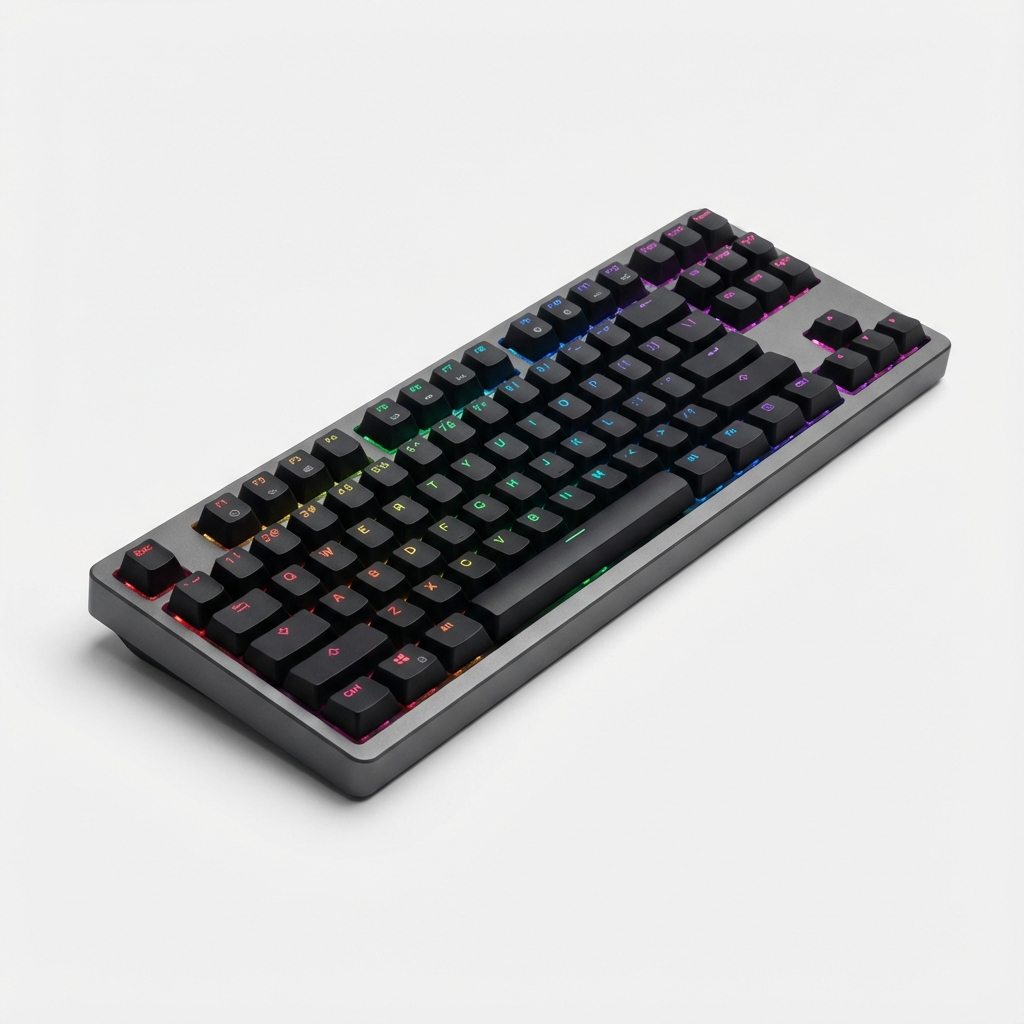
The keyboard you use daily significantly impacts your productivity and comfort. After a month of using the Keychron K8 Pro as my primary keyboard for work and writing, I'm ready to share my detailed impressions of this popular mechanical keyboard.
Why Mechanical Keyboards Matter
Before diving into the K8 Pro specifically, let's address why mechanical keyboards are worth considering.
Standard membrane keyboards work fine for occasional use, but extended typing reveals their limitations: mushy key feel, inconsistent actuation, and fatigue-inducing bottoming out. Mechanical keyboards use individual switches under each key, providing tactile feedback, consistent actuation, and a satisfying typing experience that membrane keyboards simply cannot match.
For anyone who types professionally—writers, programmers, data entry workers, remote professionals—the right keyboard is an investment in both productivity and long-term hand health.
Unboxing and First Impressions
The Keychron K8 Pro arrives in minimalist packaging that reflects the keyboard's design philosophy: functional elegance without unnecessary flash.
What's Included
- Keychron K8 Pro keyboard
- USB-C to USB-A cable (braided)
- USB-C to USB-C cable
- Switch puller and keycap puller
- Extra keycaps for Windows/Mac layouts
- Quick start guide
The inclusion of both cable types is appreciated—no adapter dongles needed regardless of your computer's ports.
Build Quality Assessment
The K8 Pro's aluminum frame immediately distinguishes it from plastic competitors. The keyboard has satisfying heft without being impractically heavy. The frosted plastic case sides allow RGB lighting to diffuse attractively while maintaining a professional appearance.
The keycaps are double-shot PBT plastic—industry standard for durability. Unlike ABS keycaps that develop shine over time, PBT maintains its texture through years of use. The legends are crisp and won't fade.
The stabilizers (the mechanisms under larger keys like spacebar and enter) are factory-lubricated and produce minimal rattle. This is a common weak point on keyboards at this price range, so the attention to detail here is notable.
Typing Experience Deep Dive
The most important aspect of any keyboard is how it feels to type on. The K8 Pro excels here.
Switch Options
Keychron offers the K8 Pro with multiple switch types. My review unit came with Gateron G Pro Brown switches—tactile, non-clicky switches ideal for office environments where audible clicking might disturb others.
Brown switches provide:
- Tactile bump indicating key registration
- Moderate resistance (45g actuation force)
- Quiet operation (no click)
- Good balance between typing and occasional gaming
Other options include:
- Red switches: Linear and smooth, preferred by gamers
- Blue switches: Tactile with audible click, satisfying but loud
Hot-swappable sockets mean you can change switches later without soldering—a significant advantage for those who might want to experiment or whose preferences evolve.
Typing Feel
After a month of daily use writing thousands of words, the K8 Pro typing experience remains consistently excellent. The Gateron G Pro switches are smooth throughout their travel, with a satisfying tactile bump that confirms each keypress without jarring harshness.
Key travel is the standard mechanical ~4mm, which feels natural after any adjustment period from laptop keyboards. The PBT keycaps provide excellent texture without being rough.
The keyboard's slightly angled design promotes a natural wrist position. I typed comfortably for extended sessions without the wrist fatigue I experienced with flatter keyboard designs.
Sound Profile
Sound matters for mechanical keyboards, especially in shared spaces. The K8 Pro with Brown switches produces a moderate "thock" sound—audible but not disruptive. It's quieter than typical Blue switches but more present than Red switches.
The aluminum frame adds a subtle bass resonance to each keypress that sounds pleasant rather than hollow. In video calls, microphones don't pick up excessive keyboard noise at normal distances.
Connectivity Options
The K8 Pro offers versatile connectivity for various setups.
Wireless Performance
Bluetooth 5.1 connects to up to three devices, switchable via keyboard shortcuts. During testing:
- Connection was reliable with no noticeable input lag for typing
- Range extended approximately 30 feet with line of sight
- Battery life reached approximately three weeks with RGB off, one week with moderate lighting
- Sleep mode activates after inactivity, with near-instant wake-up on keypress
For competitive gaming, wireless might introduce minimal latency. For typing and general use, the wireless experience is indistinguishable from wired.
Wired Mode
The USB-C connection provides reliable, lag-free input with simultaneous charging. The port is well-positioned to avoid cable strain during use.
Multi-Device Switching
Switching between paired devices takes approximately two seconds. For users working across multiple computers—personal laptop, work desktop, tablet—this feature genuinely improves workflow.
Software and Customization
The K8 Pro uses VIA/QMK-compatible firmware, offering professional-grade customization.
VIA Configuration
VIA is browser-based software for key remapping and macro creation. You can:
- Remap any key to any function
- Create multi-key macros
- Adjust lighting effects and colors
- Create multiple layers for different applications
The learning curve exists but isn't steep. Basic remapping takes minutes to learn. Complex macros require more investment but offer powerful automation.
RGB Lighting
Individually addressable RGB backlighting provides extensive customization. Pre-programmed effects include:
- Static single color
- Breathing effects
- Rainbow wave patterns
- Reactive lighting on keypress
- Custom color patterns via VIA
The south-facing LEDs illuminate legends clearly without excessive glare. Brightness adjusts across multiple levels, and all lighting can be disabled for battery conservation or professional environments.
Practical Usage Scenarios
How does the K8 Pro perform for different use cases?
Writing and Word Processing
This is where the K8 Pro shines brightest. Extended writing sessions are comfortable, and the tactile feedback helps maintain typing rhythm. After adjustment, typing speed improved compared to my previous membrane keyboard.
Programming
The programmable layers prove valuable for coding. I created dedicated shortcuts for my IDE, reducing mouse reliance. The satisfying key feel makes long coding sessions more enjoyable.
Casual Gaming
The K8 Pro handles gaming adequately. Anti-ghosting ensures multiple simultaneous keypresses register correctly. Casual gaming is perfectly comfortable. Competitive gamers might prefer the linear feel of Red switches and wired connection, but the K8 Pro is no gaming limitation for most users.
Office Compatibility
The included Windows and Mac keycaps allow easy layout switching. The OS toggle switch ensures correct modifier key behavior. The professional appearance suits office environments without drawing unwanted attention.
Comparison to Alternatives
How does the K8 Pro compare to competitors?
Versus Keychron K8 (Non-Pro)
The Pro version adds hot-swap sockets, QMK/VIA support, and slightly improved stabilizers. For users who might want to swap switches or create complex macros, the price difference is justified.
Versus Other 80% Mechanical Keyboards
The K8 Pro competes favorably against similarly priced alternatives. Build quality matches or exceeds competitors, and the Mac/Windows compatibility out of the box is a unique advantage.
Versus Full-Size Keyboards
The tenkeyless (80%) layout sacrifices the number pad for desk space savings. If you regularly use the numpad for data entry, this layout isn't suitable. For most users, the compact footprint is an improvement.
What Could Be Improved
No product is perfect. Here are the K8 Pro's limitations:
Wrist Rest Not Included
Given the keyboard's height, a wrist rest improves comfort significantly. This should be included at this price point or offered as an optional accessory.
USB-C Port Position
The USB-C port on the back-left corner can make cable routing awkward depending on your desk setup.
Limited Angle Adjustment
Two-position rubber feet provide limited typing angle adjustment. Users with specific angle preferences might want aftermarket solutions.
Keycap Legends
While durable, the font choice on keycaps is functional rather than stylish. Aftermarket keycaps are an option if aesthetics matter significantly.
Long-Term Durability
After a month of intensive use—approximately 8 hours daily—the K8 Pro shows no wear:
- Keycaps maintain texture with no shine
- All switches function identically
- Stabilizers remain quiet
- Frame shows no scratches despite desk contact
- Battery still reaches advertised life
Keychron's reputation for durability aligns with my experience.
Who Should Buy the Keychron K8 Pro?
Ideal for:
- Remote workers seeking typing comfort
- Writers who type extensively daily
- Mac and Windows users (switchable)
- Users wanting future switch customization
- Those preferring wireless flexibility with wired option
Not ideal for:
- Users requiring a numpad
- Competitive gamers (consider gaming-specific keyboards)
- Those on tight budgets
- Users happy with membrane keyboard feel
- Those requiring absolute silence
Final Verdict
The Keychron K8 Pro successfully bridges the gap between professional productivity tool and enthusiast mechanical keyboard. The build quality, typing experience, and versatile connectivity justify the investment for anyone who types regularly.
After a month, the K8 Pro has become invisible in the best way—I no longer think about my keyboard, I just type. For a productivity tool, that's the highest compliment.
Score: 9/10
The Good:
- Excellent build quality with aluminum frame
- Hot-swappable switches for future customization
- Reliable wireless with long battery life
- Works seamlessly with Mac and Windows
- Genuinely comfortable extended typing
The Not So Good:
- No wrist rest included
- USB-C port positioning
- Limited angle adjustment
- Premium pricing
For remote workers, writers, and professionals who spend significant time typing, the Keychron K8 Pro is a worthwhile investment in daily comfort and productivity.
Questions about mechanical keyboards or the K8 Pro specifically? Reach out through our contact page!